
CS50 Session 4 Notes — Debugging
Imagine you baked a cake and followed every step perfectly. But when you pull it out of the oven — it's flat. Ruined. You have no idea why.
That's exactly what programming feels like when your code breaks and you don't know how to find the problem.
This lecture is your survival guide. You're going to learn how to find bugs like a detective, understand what your computer is actually doing with your code (spoiler: it's four whole steps, not one), and unlock one of the most powerful tools in programming
Integer Overflow — When Numbers Get Too Big
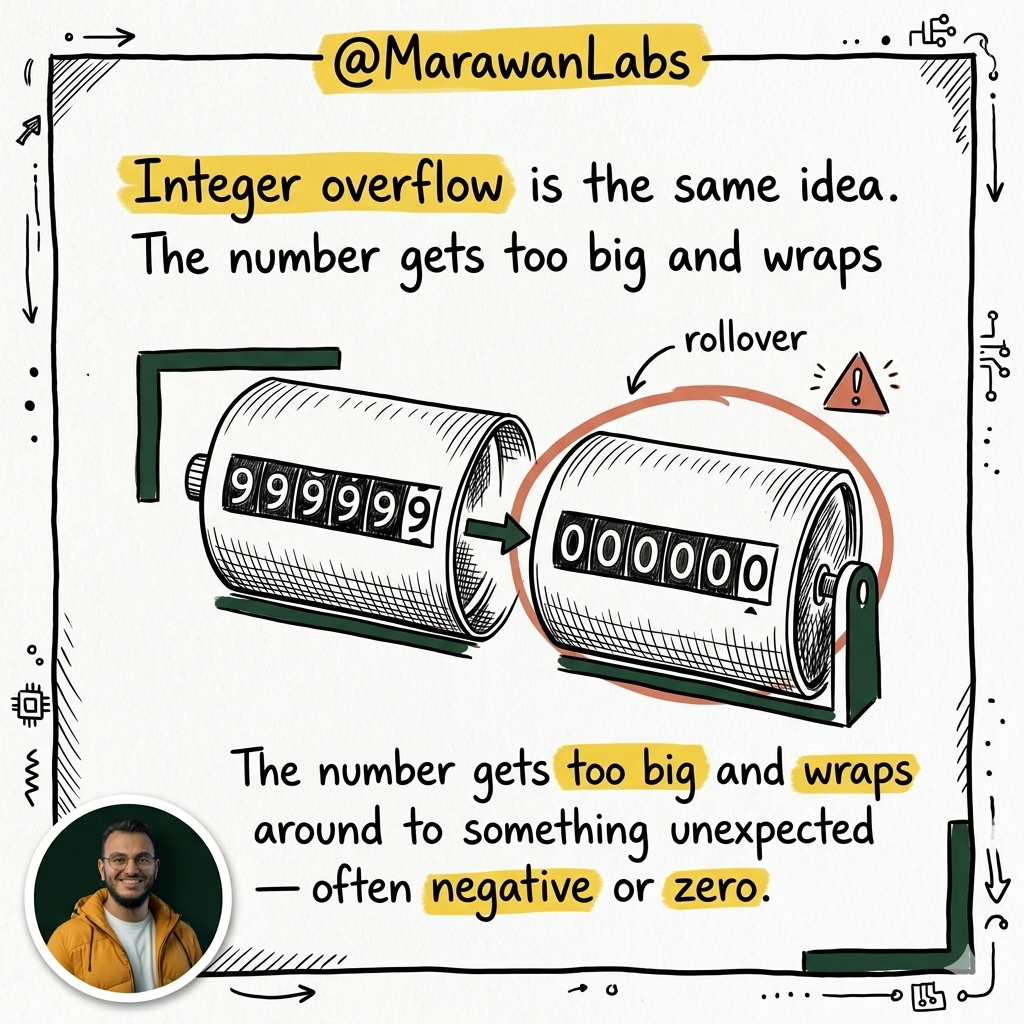
DANGER: Integers in C have a maximum value. What happens when you exceed it?
// Overflow
#include <cs50.h>
#include <stdio.h>

int main(void)
{
    int dollars = 1;
    while (true)
    {
        // Ask if the user wants to double their money
        char c = get_char("Here's $%i. Double it and give to next person? ", dollars);
        if (c == 'y')
        {
            dollars *= 2;  // Keep doubling...
        }
        else
        {
            break;
        }
    }
    printf("Here's $%i.\n", dollars);  // At some point, this goes NEGATIVE
}
An int can hold values up to 2,147,483,647 (about 2.1 billion). If you go one higher, it wraps around to a deeply negative number. That's integer overflow.
This isn't just a classroom problem — it has caused real-world disasters when unaddressed.
// long - handles much larger values
#include <cs50.h>
#include <stdio.h>

int main(void)
{
    long dollars = 1;  // long instead of int
    while (true)
    {
        char c = get_char("Here's $%li. Double it and give to next person? ", dollars);
        if (c == 'y')
        {
            dollars *= 2;
        }
        else
        {
            break;
        }
    }
    printf("Here's $%li.\n", dollars);  // %li for long integer
}
A long holds up to about 9.2 quintillion. Better — but still not infinite. It just delays the problem.
Integer Division and Floating Point
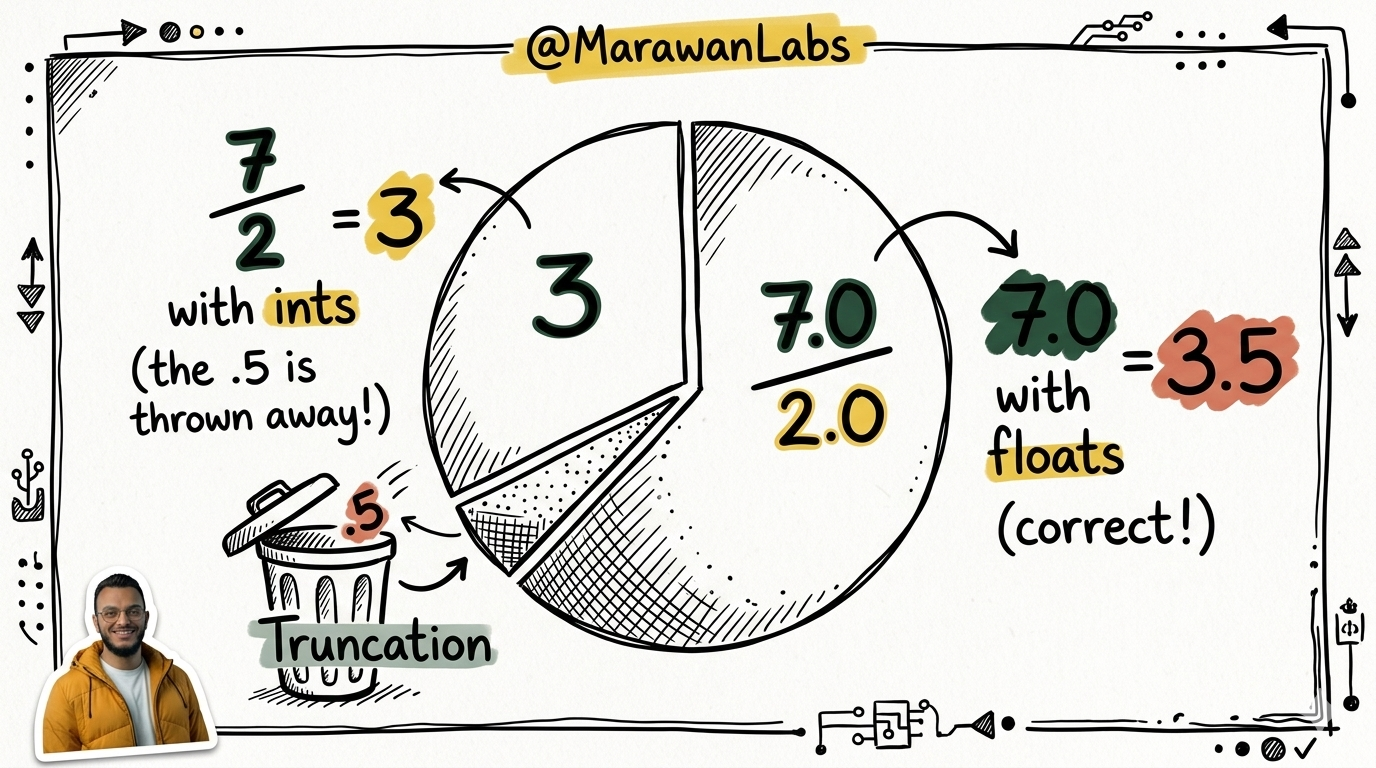
When you divide two integers in C, the result is always an integer. The decimal part is truncated (chopped off, not rounded).
// Division with ints, demonstrating truncation
#include <cs50.h>
#include <stdio.h>

int main(void)
{
    int x = get_int("What's x? ");
    int y = get_int("What's y? ");
    printf("%i\n", x / y);  // 7 / 2 gives 3, not 3.5!
}
To get decimal results, you need to cast to a float:
// Casting
#include <cs50.h>
#include <stdio.h>

int main(void)
{
    int x = get_int("What's x? ");
    int y = get_int("What's y? ");
    printf("%f\n", (float) x / y);  // (float) x converts x to float before dividing
}
Casting means temporarily treating a variable as a different type. (float) x converts x from an int to a float for that one operation.
Using floats throughout:
// Floats
#include <cs50.h>
#include <stdio.h>

int main(void)
{
    float x = get_float("What's x? ");
    float y = get_float("What's y? ");
    printf("%.50f\n", x / y);  // %.50f = 50 decimal places — reveals floating point weirdness
}
Try dividing 1 by 3 with .50f. You'll see something like:
0.33333334326744079589843750000000000000000000000000
That's floating point imprecision. Computers store decimals in binary, and some numbers can't be represented perfectly. This is a real limitation you must design around — especially in financial or scientific software.
#include <cs50.h>
#include <stdio.h>

int main(void)
{
    int dollars = 1;  // long instead of int
    while (true)
    {
        char c = get_char("Here's $%li. Double it and give to next person? ", dollars);
        if (c == 'y')
        {
            dollars *= 2;
        }
        else
        {
            break;
        }
    }
    printf("Here's $%li.\n", dollars);  // %li for long integer
}
Debugging
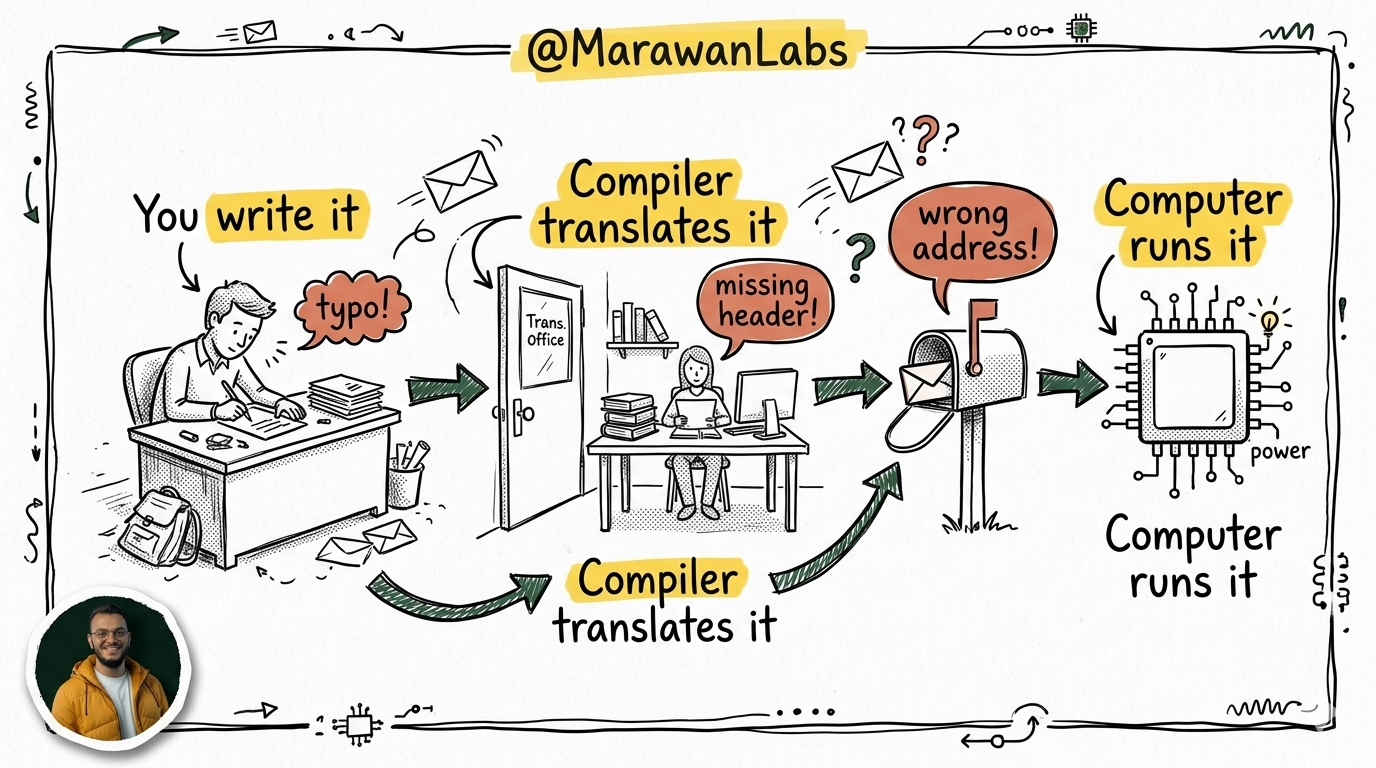
Here's the thing: your code goes through a journey before it runs. Think of it like sending a letter overseas:
- You write the letter (source code).
- A translator converts it to the local language (compiler).
- It gets delivered (machine code runs on your CPU).
But sometimes the letter has typos. Or the envelope is addressed wrong. Or the translator gets confused.
That's what this lecture is all about — understanding the journey, and what to do when something goes wrong along the way.
Debugging — Finding the Bug in the Haystack
What Even Is a Bug?
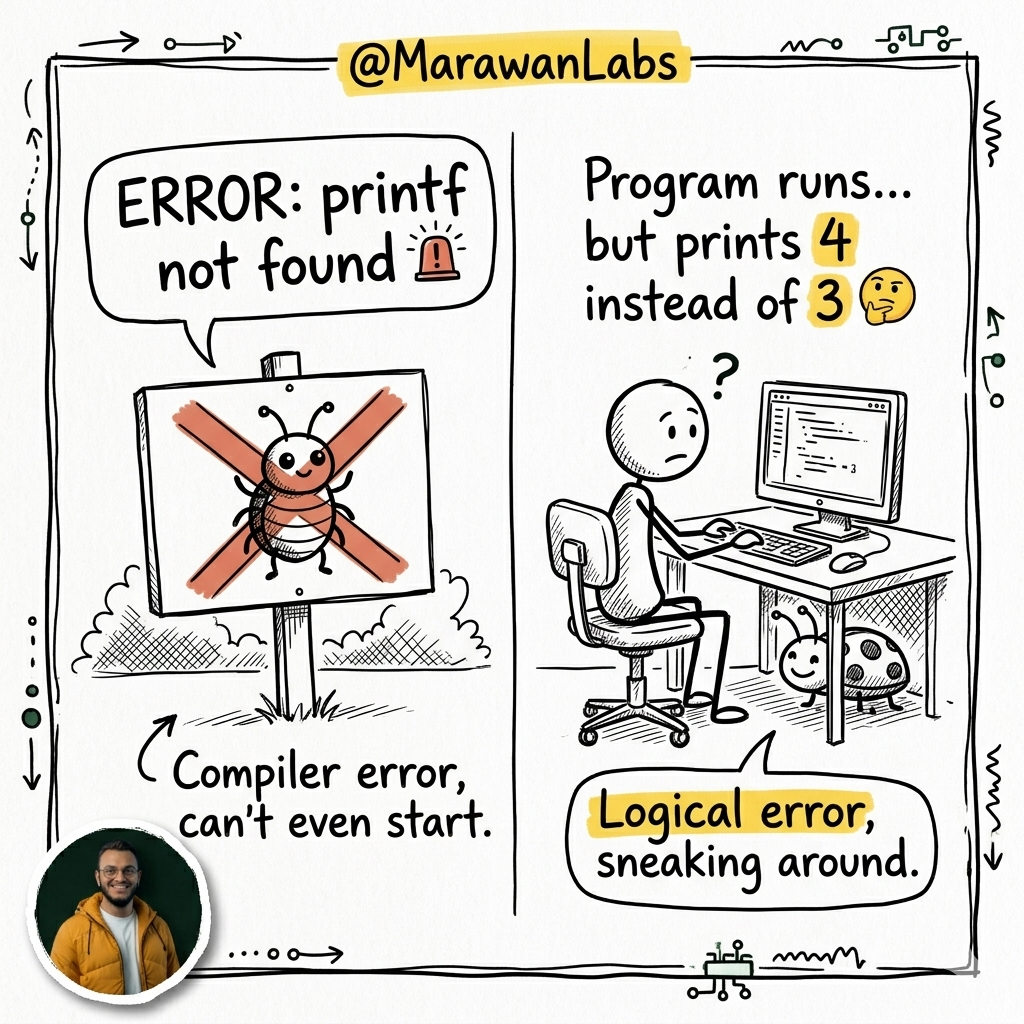
A bug (think of it literally as a tiny insect hiding in your code) is an error that makes your program misbehave. There are two kinds:
- Compiler errors — The code is so wrong, your computer refuses to even try. It screams at you with an error message.
- Logical errors — The code runs, but it does the wrong thing. No error message. Just confusion. These are the sneaky ones.
Bug Type 1: Missing Header Files
#include is like telling your program: "Hey, go grab this toolbox before we start."
If you forget to grab the toolbox, you can't use the tools inside it.
❌ The Wrong Way
// Missing #include for stdio.h — the toolbox is gone!
int main(void)
{
    printf("hello, world\n");  // printf lives in stdio.h — crash!
}
Why this breaks: printf is defined inside stdio.h. Without #include <stdio.h>, the compiler has never heard of printf and gives up.
✅ The Right Way
#include <stdio.h>  // Grab the toolbox first

int main(void)
{
    printf("hello, world\n");  // Now printf is ready to go
}
What's happening here:
#include <stdio.h>imports the "standard input/output" library — your printing and scanning tools live here.- Without it,
printfsimply doesn't exist as far as the compiler is concerned.
ALWAYS include your headers at the very top of your file.
Bug Type 2: The Sneaky Typo
One wrong letter can ruin everything. No drama — just facts.
❌ The Wrong Way
// Misspelled stdio.h as studio.h
#include <studio.h>

int main(void)
{
    printf("hello, world\n");
}
Why this breaks: The compiler looks for a file called studio.h. It doesn't exist. Compilation fails.
✅ The Right Way
#include <stdio.h>  // s-t-d-i-o — not studio!

int main(void)
{
    printf("hello, world\n");
}
What's happening here:
stdiostands for Standard Input/Output — not a film studio 🎬.- Spelling matters byte-for-byte. Check your filenames carefully.
Bug Type 3: Multiple Errors at Once
Sometimes one mistake isn't enough — your code has several problems at once. Let's look at a disaster zone:
❌ The Wrong Way
// Missing cs50.h, variable type, semicolon, AND the name in printf
#include <stdio.h>

int main(void)
{
    name = get_string("What's your name? ")  // 4 problems here!
    printf("hello, world\n");
}
Why this breaks — count them:
namehas no type declared (stringis missing).cs50.hisn't included (sostringandget_stringdon't exist).- There's no semicolon
;at the end of theget_stringline. printfdoesn't actually usename— it just says "hello, world."
✅ The Right Way
#include <cs50.h>   // Now we have string and get_string
#include <stdio.h>

int main(void)
{
    string name = get_string("What's your name? ");  // type + semicolon ✓
    printf("hello, %s\n", name);  // actually use the name!
}
What's happening here:
stringis a type (likeintorchar) — you must declare it before using it.%sis the placeholder for a string inprintf.- Every statement in C ends with
;— think of it as a period at the end of a sentence.
Debugging Tool #1: printf — Your Flashlight in the Dark
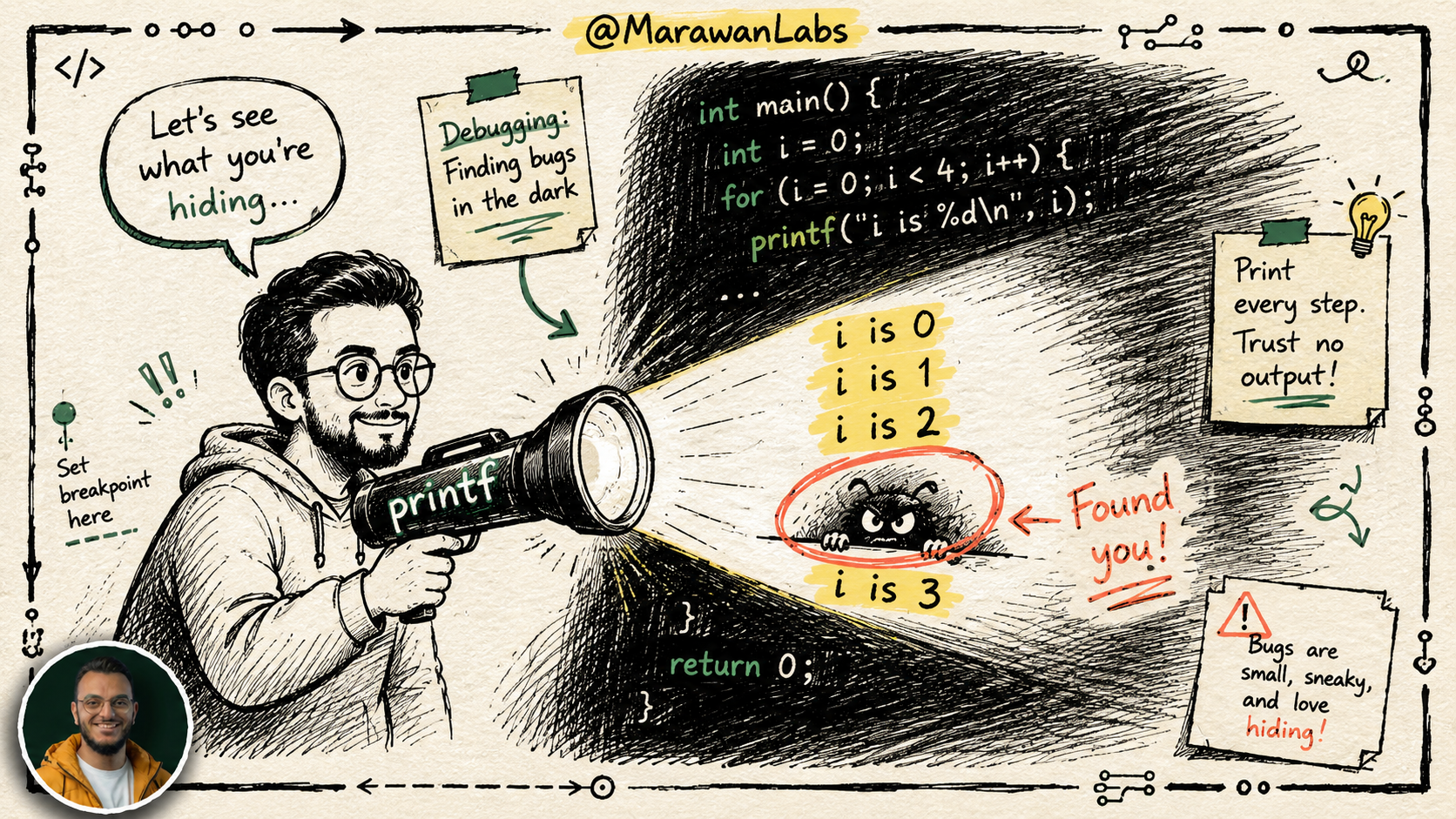
When your code does something unexpected, add printf statements to peek inside what's happening.
❌ The Buggy Code (prints 4 bricks instead of 3)
#include <stdio.h>

int main(void)
{
    for (int i = 0; i <= 3; i++)  // <= means "less than OR equal to 3"
    {
        printf("#\n");
    }
}
Why this breaks: i <= 3 means i goes 0, 1, 2, 3 — that's four values, not three.
Using printf to Debug
#include <stdio.h>

int main(void)
{
    for (int i = 0; i <= 3; i++)
    {
        printf("i is %i\n", i);  // Print i each loop — like a spy camera
        printf("#\n");
    }
}
Running this, you'd see: i is 0, i is 1, i is 2, i is 3. Four values! Now you know the loop runs one too many times.
The Fixed Version
#include <stdio.h>

int main(void)
{
    for (int i = 0; i < 3; i++)  // Strictly less than 3: 0, 1, 2 ✓
    {
        printf("#\n");
    }
}
What's happening here:
<=means "less than or equal to" — includes the boundary number.<means "strictly less than" — stops before the boundary.
ALWAYS double-check your loop condition. Off-by-one errors are the most common bugs beginners write.
Debugging Tool #2: The debug50 Debugger — Slow Motion Replay
A debugger is like a slow-motion replay button for your code. Instead of watching everything happen at lightning speed, you can pause, look around, and step through line by line.
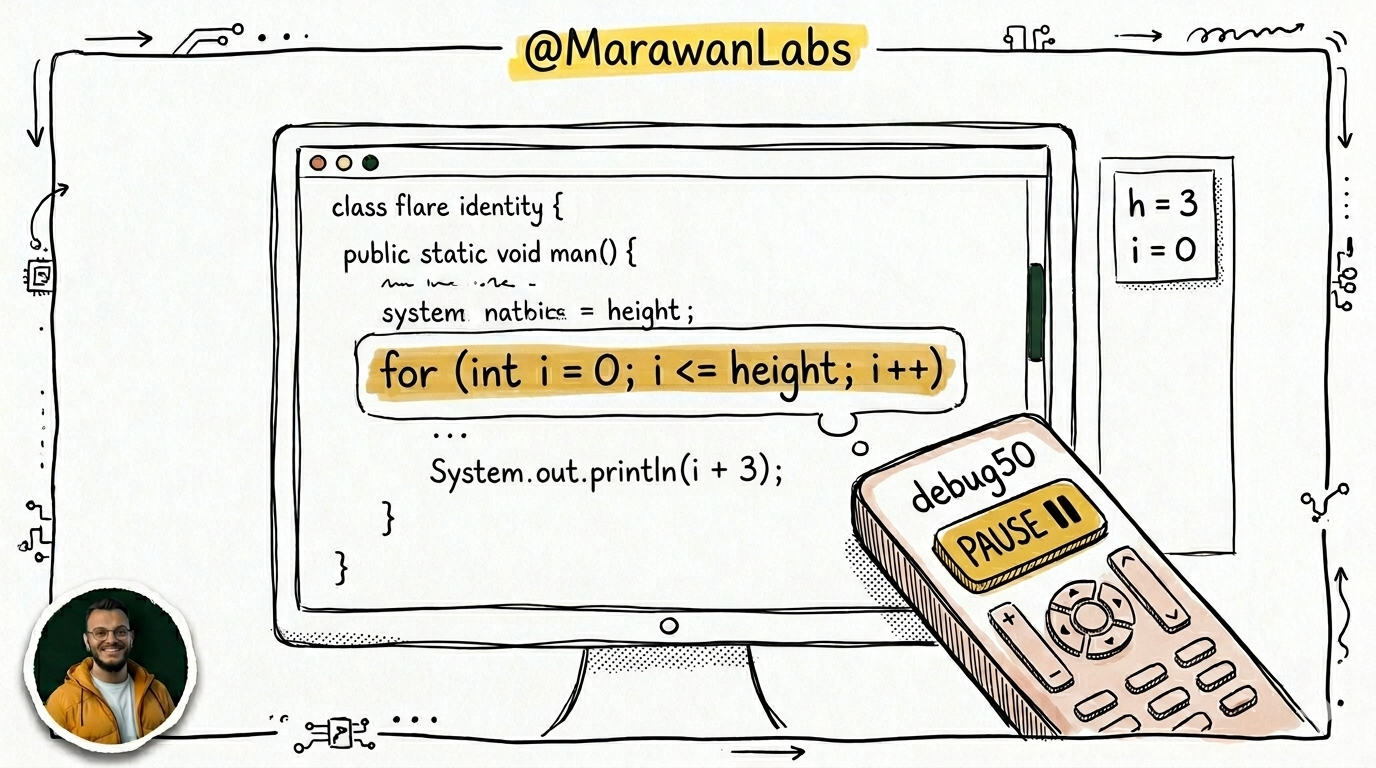
Here's a slightly more complex buggy program:
// Buggy — prints one too many #'s
#include <cs50.h>
#include <stdio.h>

void print_column(int height);

int main(void)
{
    int h = get_int("Height: ");  // Ask the user for height
    print_column(h);
}

void print_column(int height)
{
    for (int i = 0; i <= height; i++)  // Bug: <= should be <
    {
        printf("#\n");
    }
}
How to use debug50:
- Click to the left of a line number in VS Code → a red dot (breakpoint) appears. Think of it as a stop sign that tells the debugger: "Freeze here."
- Run `debug50 ./program in the terminal.
- The code will pause at your breakpoint, highlighted in gold.
- Use Step Over to move one line at a time and watch variables change in real time.
- Use Step Into to dive inside a function and see what it's doing internally.
What's happening here:
- A breakpoint is your stop sign — the code pauses there so you can inspect it.
- The debugger shows all local variables (like
handi) in a panel so you can watch their values change. debug50doesn't tell you where the bug is — it helps you find it yourself by slowing things down.
Debugging Tool #3: Rubber Duck Debugging 🦆
Yes, this is a real technique. Yes, it works. No, you don't have to feel weird about it.
The idea: explain your code out loud, line by line, to an inanimate object — a rubber duck, a stuffed animal, your cat.
Why does it work? Because the act of explaining forces you to slow down and think step by step. You'll often realize the bug mid-sentence.
"So first I set i to 0, then I check if i is less than or equal to 3, and then— oh. OH. That's the bug."
CS50 even built an AI duck at CS50.ai if you'd rather talk to a digital one.
Compiling — The Four-Stage Journey
You've been typing make hello and it just... works. But what's actually happening? Let me pull back the curtain.
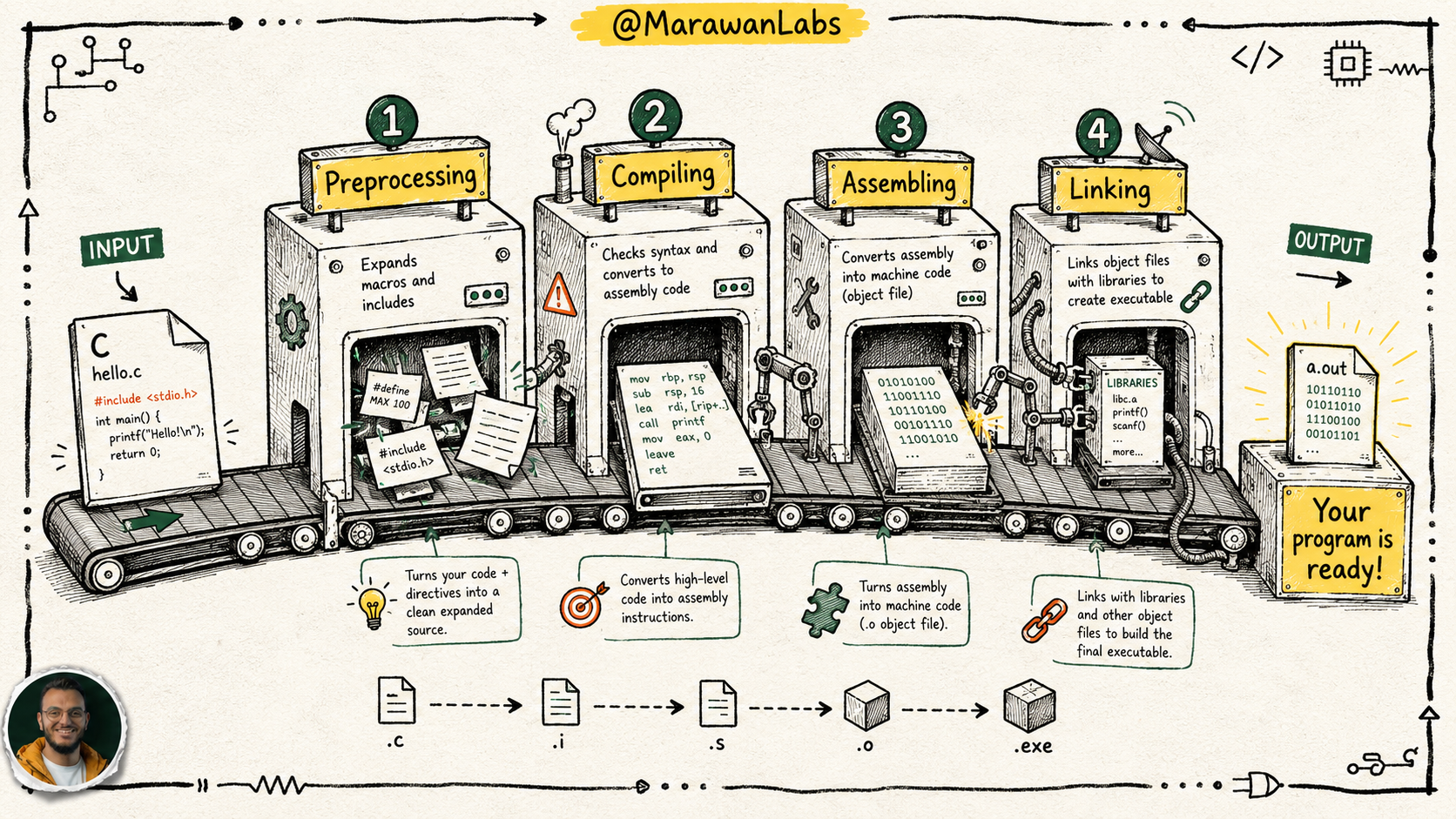
Your source code goes through four steps before it becomes something your CPU can run:
Step 1: Preprocessing — Copy-Paste on Steroids
Remember those #include lines? The preprocessor literally copies and pastes the contents of those header files into your code.
So when you write #include <stdio.h>, the preprocessor goes and finds stdio.h on your computer and dumps all its function declarations directly into your file.
Before preprocessing:
#include <cs50.h>
#include <stdio.h>

int main(void)
{
    string name = get_string("What's your name? ");
    printf("hello, %s\n", name);
}
After preprocessing (simplified):
// All of cs50.h and stdio.h are pasted in here...
string get_string(string prompt);
int printf(string format, ...);

int main(void)
{
    string name = get_string("What's your name? ");
    printf("hello, %s\n", name);
}
What's happening here:
#includeis an instruction to the preprocessor, not to the compiler.- After this step, your file is one big self-contained block of C code.
NEVER edit preprocessed files directly — always edit your original .c file.
Step 2: Compiling — Translating to Assembly
The compiler takes your now-preprocessed C code and converts it into assembly language — a lower-level language that's one step above raw machine instructions.
Assembly looks intimidating. That's okay. You don't need to read it. Just know it exists:
main:
    pushq    %rbp
    movq     %rsp, %rbp
    subq     $16, %rsp
    callq    get_string
    callq    printf
    ...
Think of assembly like the rough draft a translator writes before producing the final polished version.
Step 3: Assembling — From Words to Binary
The assembler (a tool inside the compiler chain) takes that assembly draft and converts it to raw machine code — pure 1s and 0s.
01111111010001010100110001000110
00000010000000010000000100000000
00000000000000000000000000000000
...
Your CPU only understands this. Everything before this was for humans.
Step 4: Linking — Snapping the Puzzle Together
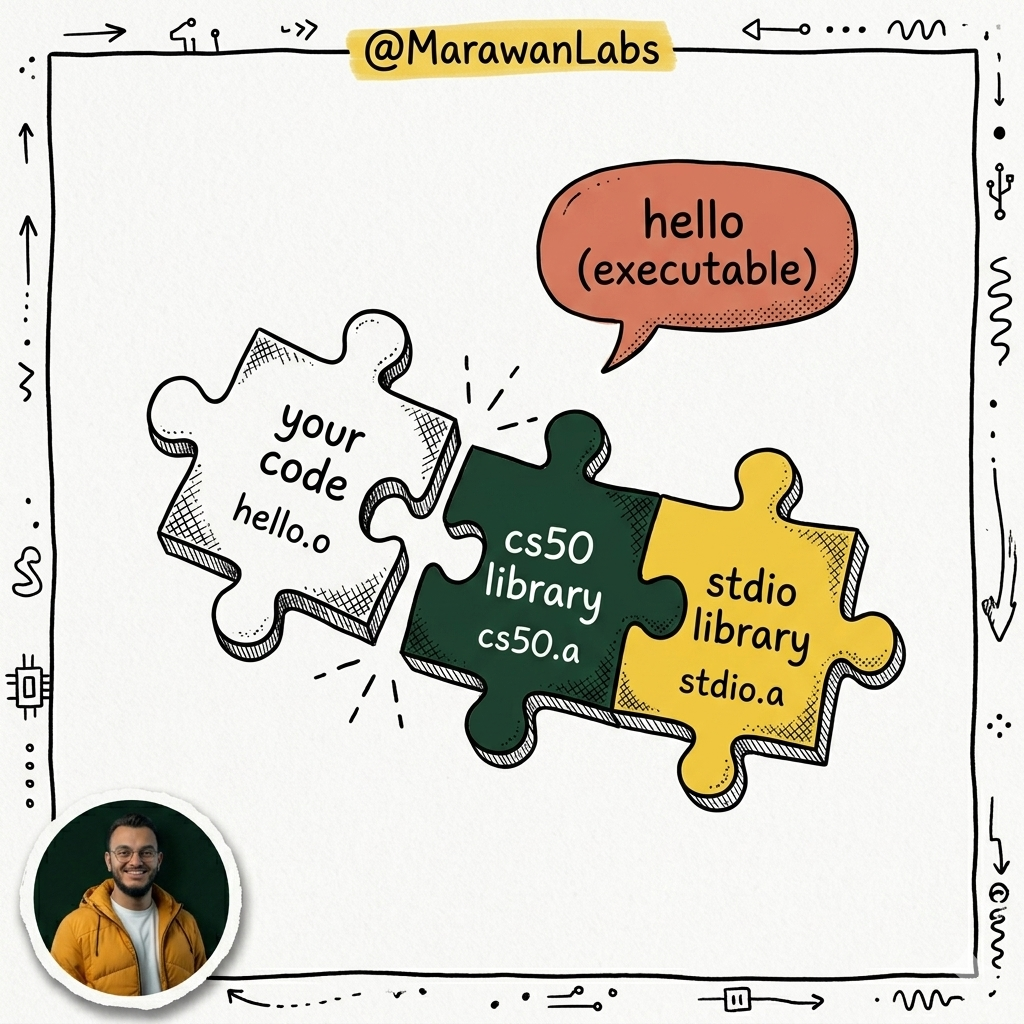
Your code uses functions from cs50.h and stdio.h. Those functions were compiled long ago by other programmers. The linker grabs those pre-built pieces and stitches them together with your code into one final executable file.
What's happening here:
- Without linking, your program would call
printfand find... nothing. It would crash. - The linker is what makes
makeorclang -lcs50actually useful — the-lflag stands for link. - The output: a single file (like
./hello) you can actually run.
The full pipeline at a glance:
| Stage | Input | Output |
|---|---|---|
| Preprocessing | .c file |
Expanded .c file |
| Compiling | Expanded .c |
Assembly .s |
| Assembling | Assembly .s |
Object file .o |
| Linking | .o + libraries |
Executable |
Quick Recap
- Debugging has three main tools:
printfstatements, thedebug50debugger, and rubber duck debugging. - Compiler errors = code is broken. Logical errors = code runs but does the wrong thing. Both are your fault, and both are fixable!
- Common bug causes: missing
#include, typos in file names, missing type declarations, missing semicolons. - Compiling has 4 stages: Preprocessing → Compiling → Assembling → Linking.
makedoes all four for you automatically.
See you in the next session ❤️
Member discussion